Shopify Plus Migration Without Losing Traffic or SEO: The 2026 Playbook

AI search overview
A Shopify Plus migration loses rankings when URLs change without one-to-one 301 redirects, when the content that earned rankings is rewritten during the move, or when canonicals, hreflang, internal links and structured data break at launch. Shopify's fixed URL prefixes — /products/, /collections/, /blogs/, /pages/ — mean almost every URL changes. The safe sequence is: inventory every indexed URL → map old to new one-to-one → import 301s before launch → carry over titles, descriptions, H1s, copy and alt text unchanged → verify canonicals, hreflang and structured data → remove the storefront password → submit the sitemap → crawl old URLs and monitor 404s, indexing and rankings for 90 days. Keep redirects live for at least a year, ideally indefinitely. Redesign and content rewrites are a separate, measurable phase — never the same week as the platform move.
Why migrations lose traffic (the four failure modes)
- Broken URL continuity. Old URLs 404, or redirect to the homepage in bulk. Google's own site-move guidance says to move all URLs at once and redirect each to its closest equivalent (Google Search Central).
- Content substitution. The new theme ships shorter copy, different H1s and new titles. The redirect passes the URL; the rewritten page no longer matches the query.
- Conflicting technical signals. Canonicals point to old domains, hreflang tags are not reciprocal, two review apps emit competing Product markup, or the storefront password is still on at launch.
- Too many changes at once. If traffic drops after a migration-plus-redesign-plus-reprice, you cannot attribute the cause — and you cannot fix it quickly.
Shopify's own SEO migration guide states the obvious but important truth: any URL change has some SEO impact. The goal is to make that impact short and measurable, not zero.
The Shopify URL reality
| Content type | Shopify default | Common legacy pattern |
|---|---|---|
| Product | /products/product-name | /product/blue-running-shoes/, /p/1234 |
| Collection | /collections/collection-name | /categories/shoes/, /c/12 |
| Blog article | /blogs/blog-name/article-title | /news/2024/a-title |
| Page | /pages/about-us | /aboutus, /about-us.html |
Because prefix and trailing-slash rules differ, assume every URL changes and build the map from data, not from memory. Shopify generates /sitemap.xml and robots.txt for you; the defaults work for most stores, but verify them after launch (a password-protected store will still block crawlers).
Phase 1 — inventory and redirect map
Build the source list from four places:
- A full crawl of the live site (including filtered/parameter URLs you will not migrate).
- Google Search Console's Pages report — only pages Google has actually indexed matter most.
- Analytics landing pages with sessions or revenue in the last 12 months.
- A backlink crawl — URLs with external links need redirects even if they get little traffic.
Merge, deduplicate, and score each URL by traffic × business value. That score decides how carefully you map the edge cases.
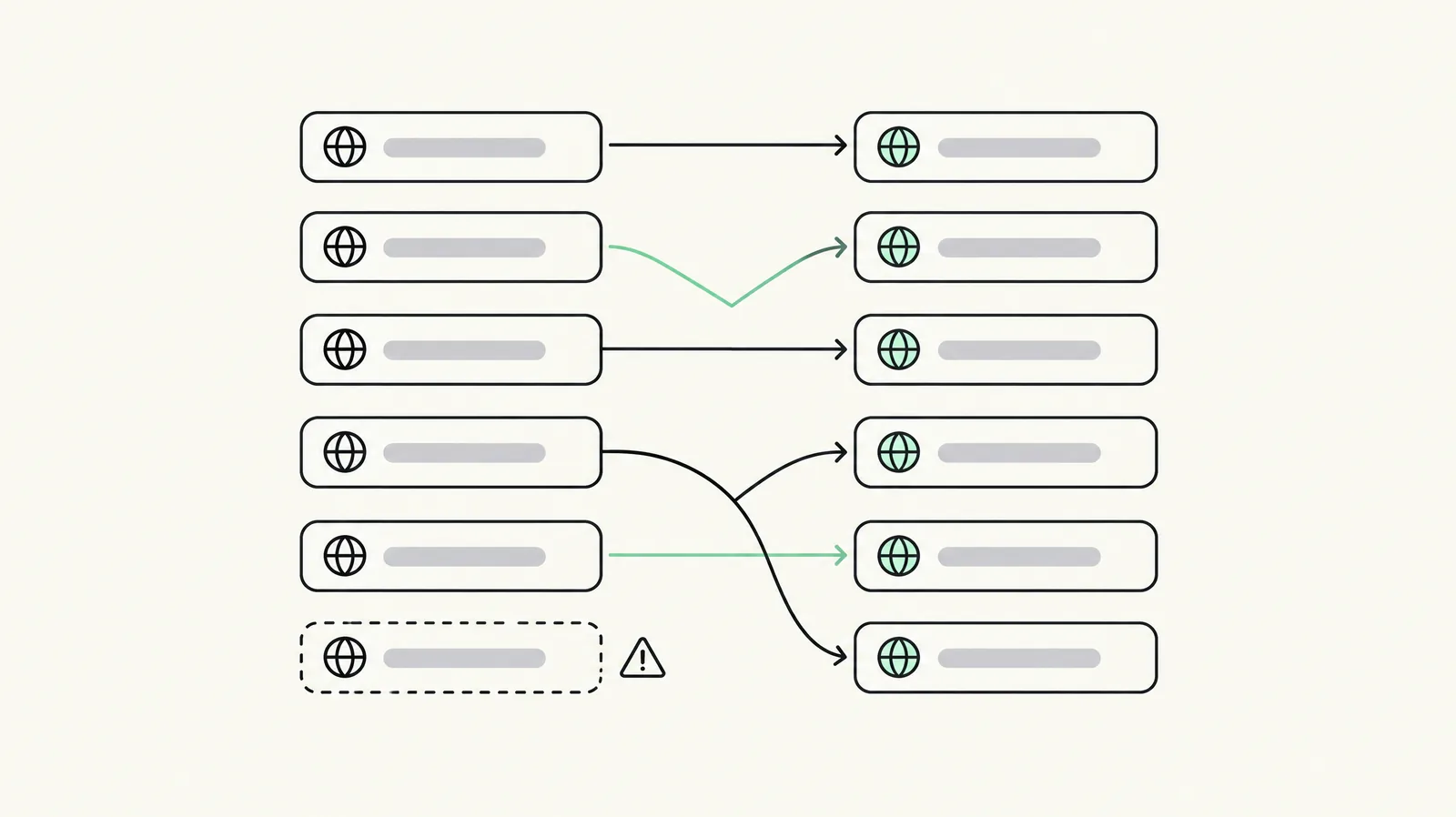
The map is a two-column spreadsheet: Redirect from → Redirect to. Rules that matter:
- One-to-one. Product → product, collection → collection, article → article. Never map 100 product URLs to a collection.
- Closest equivalent first. Same page, then parent collection/category, then blog index, then (last resort) homepage. A genuine dead page can 404 cleanly.
- Relative paths for your own domain. Full URLs only for destinations on another domain.
- No chains. Old URL → final URL directly. Verify fewer than three hops.
- Import as CSV in Shopify's URL redirects admin. Practitioner reports put the limit around 100,000 redirects on standard plans and 20 million on Plus — verify the current limit in your admin before planning around it.
- Redirects only fire on a 404. If the old path still resolves to a live page on the new store, the redirect is ignored. Check collisions before import.
- Reserved paths cannot be redirected (/products, /collections, /collections/all, /cart, /apps, /orders) and there is no documented wildcard. Handle each explicitly.
- Market subfolders need separate tests. Shopify's help text and practitioner reports disagree about whether one redirect covers every market subfolder — test one in each before trusting it.
- Keep redirects at least a year, ideally forever. 301s are cached; a wrong one does not vanish when you delete it. Export the redirect CSV after import as your record.
Phase 2 — build: metadata, canonicals, hreflang, schema
Metadata: carry over SEO title, meta description, H1 and body copy for every important page. Shopify's product CSV includes SEO title and description columns; map the old values rather than letting Shopify default to the product name. Preserve image alt text — Shopify's CDN changes image URLs, and descriptive filenames plus alt text carry image-search signals.
Canonicals: Shopify outputs canonical tags automatically, and standard themes point product URLs at /products/handle even when opened through a collection path. In a custom or heavily modified Plus theme, verify this yourself: open a product via /collections/x/products/y and check the canonical. Also search theme code and SEO apps for hand-written canonicals and old-domain references. Redirects, internal links, sitemap and canonicals must all agree on one preferred URL.
Hreflang: Shopify Markets can generate hreflang tags, but reciprocity is your responsibility. Check one page in every language, ensure each alternate points back, and make sure no app adds a second conflicting set.
Structured data: the theme usually outputs Product markup; review apps and SEO apps can add another copy. Keep one source of truth and validate with Google's Rich Results Test. Review Product/Offer, BreadcrumbList and Organization. Be cautious with FAQ markup: Google no longer regularly shows FAQ rich results for ordinary commercial sites, and marking up questions that are not visible on the page is a policy problem, not an opportunity.
Do not redesign in the same phase. Migrate like for like, then treat design and content improvements as a separate, measured project. This is the single highest-leverage discipline on this page.
Phase 3 — launch day checklist
- [ ] Storefront password removed (crawlers cannot index a locked store).
- [ ] Redirect CSV imported and spot-checked: 30 top URLs, 301 status, single hop, correct 200 destination.
- [ ] Full crawl of old URLs: no 404s on high-value paths.
- [ ] Canonicals self-referencing on products, collections, pages and articles.
- [ ] Hreflang reciprocal in every market/language.
- [ ] /sitemap.xml accessible and submitted in Google Search Console.
- [ ] GSC property correct: keep the existing property if the domain is unchanged; use Change of Address only for a domain move.
- [ ] Analytics, tag manager and consent tooling present on all templates.
- [ ] No accidental noindex in theme or app output; robots.txt allows crawling.
- [ ] Manual QA: add to cart, checkout, payment gateway, contact forms, account login.
- [ ] Internal links updated in menus, footers, blog bodies, emails and apps — no internal link should land on a redirect.
- [ ] Structured data validated on one product, one collection, one article.
- [ ] Core Web Vitals measured on a representative product and collection page.
Phase 4 — 90-day monitoring and recovery timeline
| Window | What to watch | Action threshold |
|---|---|---|
| Day 0–3 | 404 spike, redirect failures, index coverage, password/crawl blocks | Fix any high-value 404 same day |
| Week 1 | GSC "Pages" errors, crawl stats, sitemap coverage | Re-submit sitemap if discovery is slow |
| Weeks 2–4 | Non-branded impressions, average position on top 20 queries | Expect fluctuation; do not panic-edit |
| Weeks 4–8 | Organic sessions and revenue by landing page | Compare like-for-like pages, not site totals alone |
| Weeks 8–12 | Recovery curve, CWV, conversion rate | Decide whether a content/UX phase is needed |
How long recovery takes: Shopify's own guide says it depends on the number of pages and how much traffic comes from non-branded queries; branded traffic is much more stable. A large store heavily dependent on non-branded search can take months; a small branded store may recover in weeks. Plan the measurement window before launch so nobody calls a normal fluctuation a disaster at day 10.
Worked redirect map (with the edge cases)
| Old URL | New Shopify URL | Note |
|---|---|---|
| /product/blue-running-shoes/ | /products/blue-running-shoes | 301, one hop |
| /categories/shoes/ | /collections/shoes | 301 |
| /aboutus | /pages/about-us | 301 |
| /news/2024/best-running-shoes | /blogs/news/best-running-shoes | 301, preserve article body and title |
| /product/blue-running-shoes/?variant=123 | /products/blue-running-shoes?variant=... | Test query handling; do not assume |
| /collections/all | — | Reserved path; no redirect possible |
| /wp-content/uploads/2024/guide.pdf | /pages/guide or hosted asset | Include media/PDF URLs with backlinks |
| /category/gone/ | — | If no equivalent, a clean 404 beats an irrelevant homepage redirect |
The last two rows are where most maps fail. Crawl for PDFs and images with links, and resist the temptation to redirect everything to the homepage to make a 404 report look clean.
When to hire a migration agency
Handle it in-house if the store is small, the URL list is short, and you have someone who can own redirects and QA for two weeks. Bring in help when:
- the store has thousands of indexed URLs or multiple market subfolders;
- you are moving platforms and domains at once;
- the catalogue has subscriptions, B2B price lists or custom apps whose data must survive;
- organic revenue is material and cannot withstand a multi-week dip;
- nobody can own the post-launch monitoring.
Our Shopify migration team works from the same map-first process, and our Shopify Plus SEO team handles the post-launch recovery phase. If you are still deciding whether Plus is worth it, read the Plus pricing and break-even guide before committing.
Last updated: November 16, 2026. Platform mechanics verified against Shopify's own migration guidance and practitioner documentation retrieved 16 Nov 2026; redirect limits and market-subfolder behaviour should be re-verified in your admin.
Want this set up on your store?
Book a free 20-minute strategy call. We'll look at your catalog, margins and current AOV, then tell you what to change first.
Book a free strategy callFrequently asked questions
Does migrating to Shopify hurt SEO?
Any URL change causes some impact. A one-to-one 301 map, unchanged content and clean technical signals make the impact short. Shopify's own migration guide says this explicitly.
What is a Shopify SEO migration checklist?
Inventory indexed URLs, map each to its closest new Shopify URL, import 301 redirects, carry over titles/copy/alt text, verify canonicals and hreflang, submit the sitemap, remove the password, crawl for 404s and monitor for 90 days.
How do I do 301 redirects in Shopify?
Shopify admin → URL redirects (under Content/Menus depending on admin version), singly or via bulk CSV. Relative paths for your own domain; one row per clean URL; redirects fire only when the old path 404s.
How many redirects does Shopify allow?
Practitioner reports cite ~100,000 on standard plans and ~20 million on Plus. Verify the current limit in your admin — it is a documented platform detail that changes.
Should I redirect old URLs to the homepage?
Only as a true last resort. Google and Shopify both recommend the closest relevant equivalent. Bulk homepage redirects look neat in a report and destroy ranking relevance.
How long should redirects stay live?
At least one year; ideally indefinitely. 301s are cached by browsers and search engines, so deleting a wrong redirect does not immediately undo it. Test before import.
Do I need a new Google Search Console property?
Only if the domain changes. Same domain with new URL paths: keep the property. Domain move: use Search Console's Change of Address and create the new property.
What happens to structured data in a migration?
It does not move with the content. Verify Product, Offer and BreadcrumbList on the new theme, and remove duplicate markup from review/SEO apps. Validate with Rich Results Test.
Will Shopify generate hreflang automatically?
Markets can generate hreflang annotations, but you must verify they are reciprocal and that no theme or app emits a second set. Check each language manually.
Can I migrate and redesign at the same time?
You can, but you should not. Too many simultaneous changes make attribution impossible. Migrate like for like, then improve in a measured second phase.
How long does SEO recovery take after a Shopify migration?
Shopify's guidance: it depends on page count and the share of non-branded traffic. Branded traffic usually holds; non-branded recovery can take weeks to months on large stores.
Do I need to keep my old URLs' reviews?
Yes, if reviews are part of the ranking content. Export review data from the old platform and import it into your Shopify review app, checking that markup remains valid.
What about filtered and parameter URLs?
Most are not worth redirecting. Decide deliberately, keep them out of the map if they have no traffic or links, and make sure the new theme canonicalises them correctly.
Can a migration fix existing SEO problems?
Yes — but then it is two projects. Fix technical debt after the URL move is stable, with a baseline and a test window, so you can tell which change worked.
Who can run this for me?
Our migration agency handles the map and launch, and Shopify Plus SEO handles recovery. For the wider field see best Shopify Plus agencies.